
How to Run an Internal Food Safety Audit (International Standard)
Walk your kitchen with a 71-point checklist, take temperature readings, get a grade from A+ to E and close every corrective action — step by step, with screenshots.

An inspector walks into your kitchen. Would you pass? An internal audit answers that question before anyone else asks it — and it turns "we should fix that one day" into a short list with an owner and a date.
AKROUN FOOD AI gives you a full internal audit built on international food-safety standards — the Codex Alimentarius principles of food hygiene and HACCP — so it works in any country: 71 checkpoints in 14 areas, temperature readings, photos, a score and a grade from A+ Gold to E, and a corrective action plan you close one item at a time.
Internal audits are part of the Chef Pro plan. You find them under Food Safety → Audits.
What the checklist covers
Licences and documents, premises, hand-washing, receiving and suppliers, storage, preparation and cross-contamination, cooking and temperature control, allergens and labelling, personal hygiene, cleaning, pest control, waste and water, training and management — plus four catering checkpoints for businesses that serve off-site.
Every temperature in the checklist comes from your own limits in Food Safety → Settings, so the same audit works in any country.
Step by step
1. Start the audit
Open Food Safety, choose the Audits tab and press Start a new audit. The report number, date and your establishment details are filled in for you.
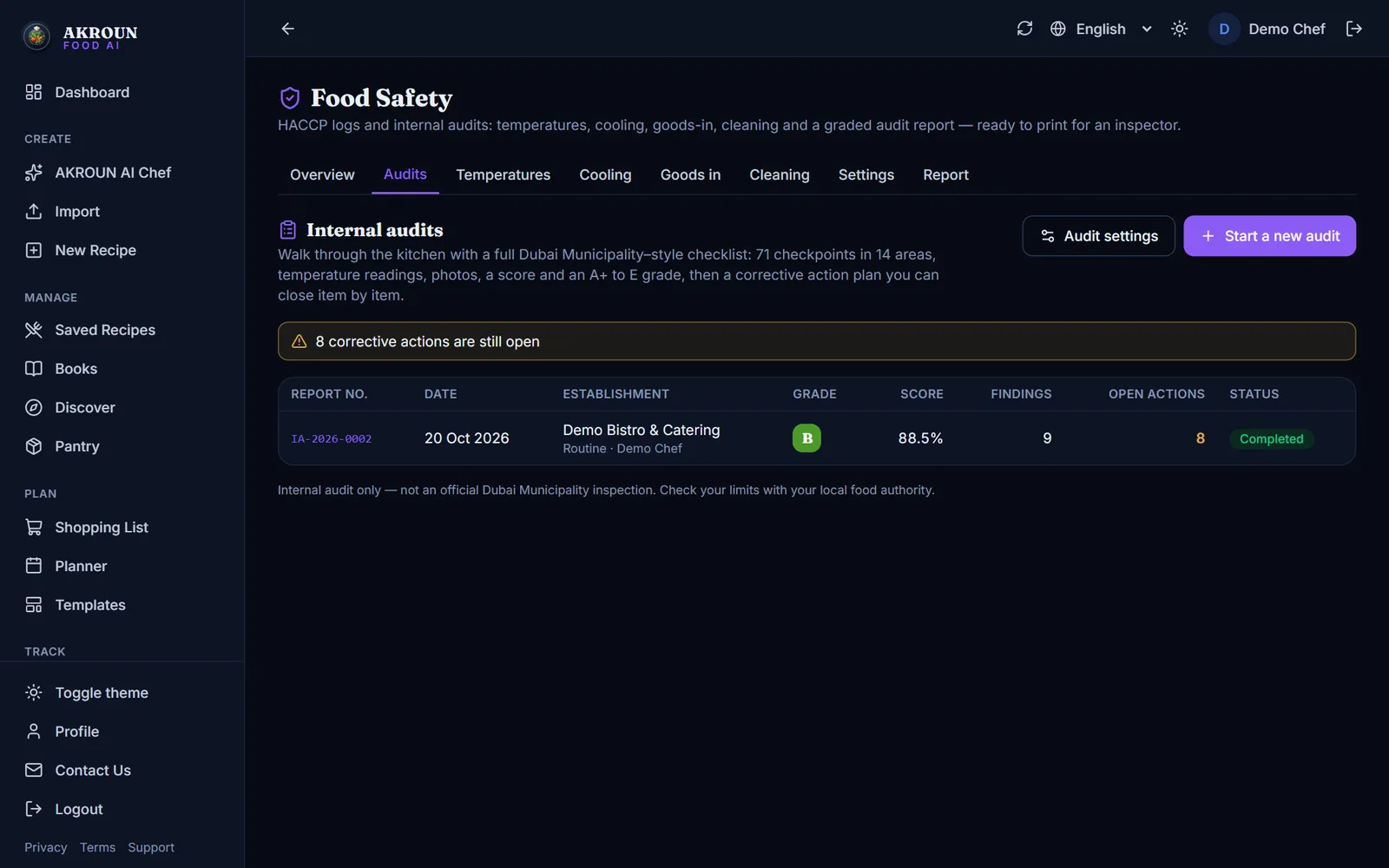
Press Audit settings once to save your activity, trade licence number, address and person in charge — every new audit starts with them. That is also where you can change the grade cut-offs or switch on the catering checkpoints.
2. Walk the kitchen with the checklist
Take your phone or tablet with you. For every checkpoint press Compliant, Not compliant or N/A. When something is not compliant, write what you found, the corrective action and who will do it — and press Add a photo to keep the evidence.
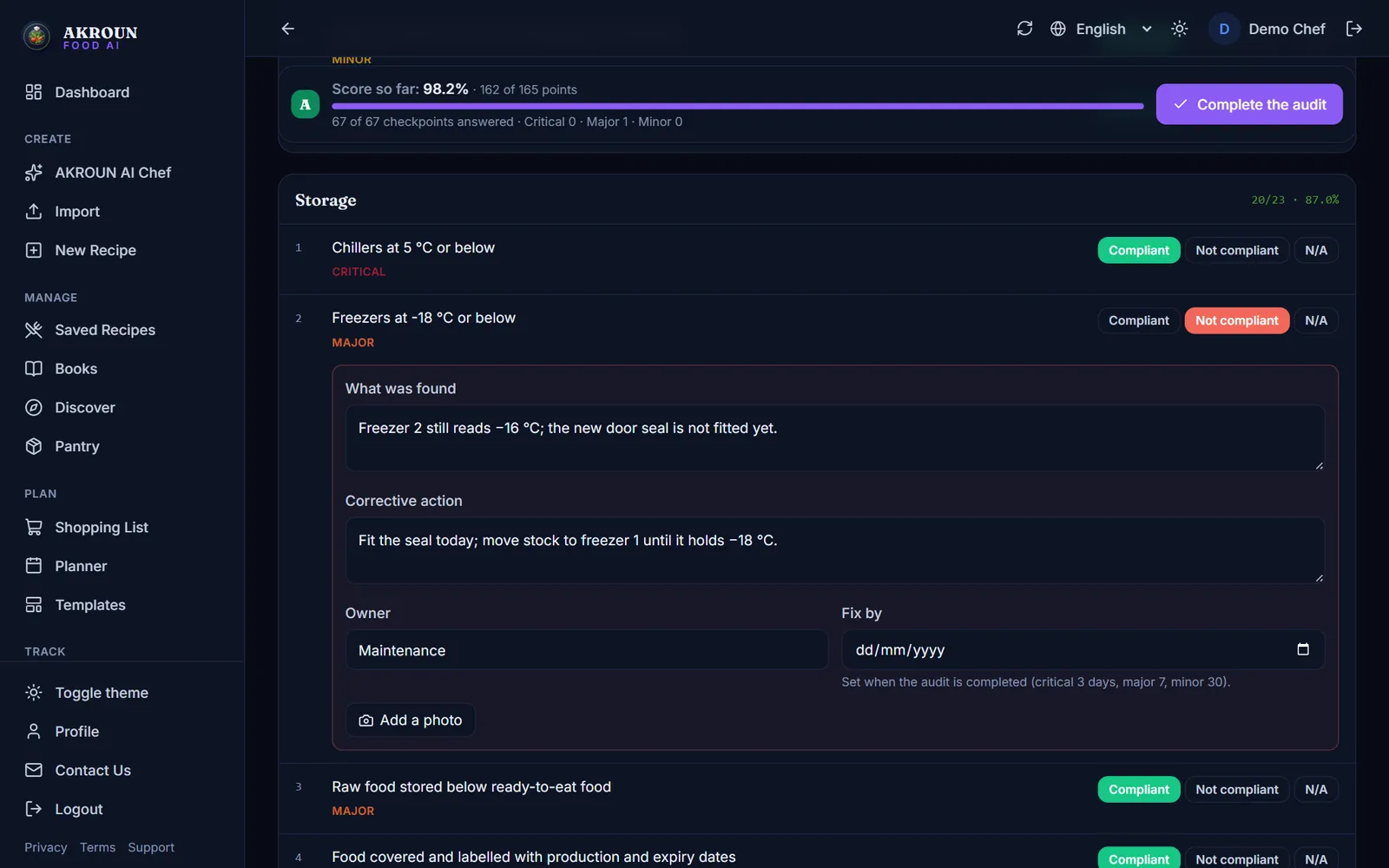
The score and grade at the top update as you go. Each checkpoint has a risk level — Critical, Major or Minor — so you always see what matters most.
3. Take temperature readings
Probe your chillers, freezers, hot holding and a cooked dish, type each reading and press Add reading. The app checks every reading against your limits and marks it Pass or Fail.
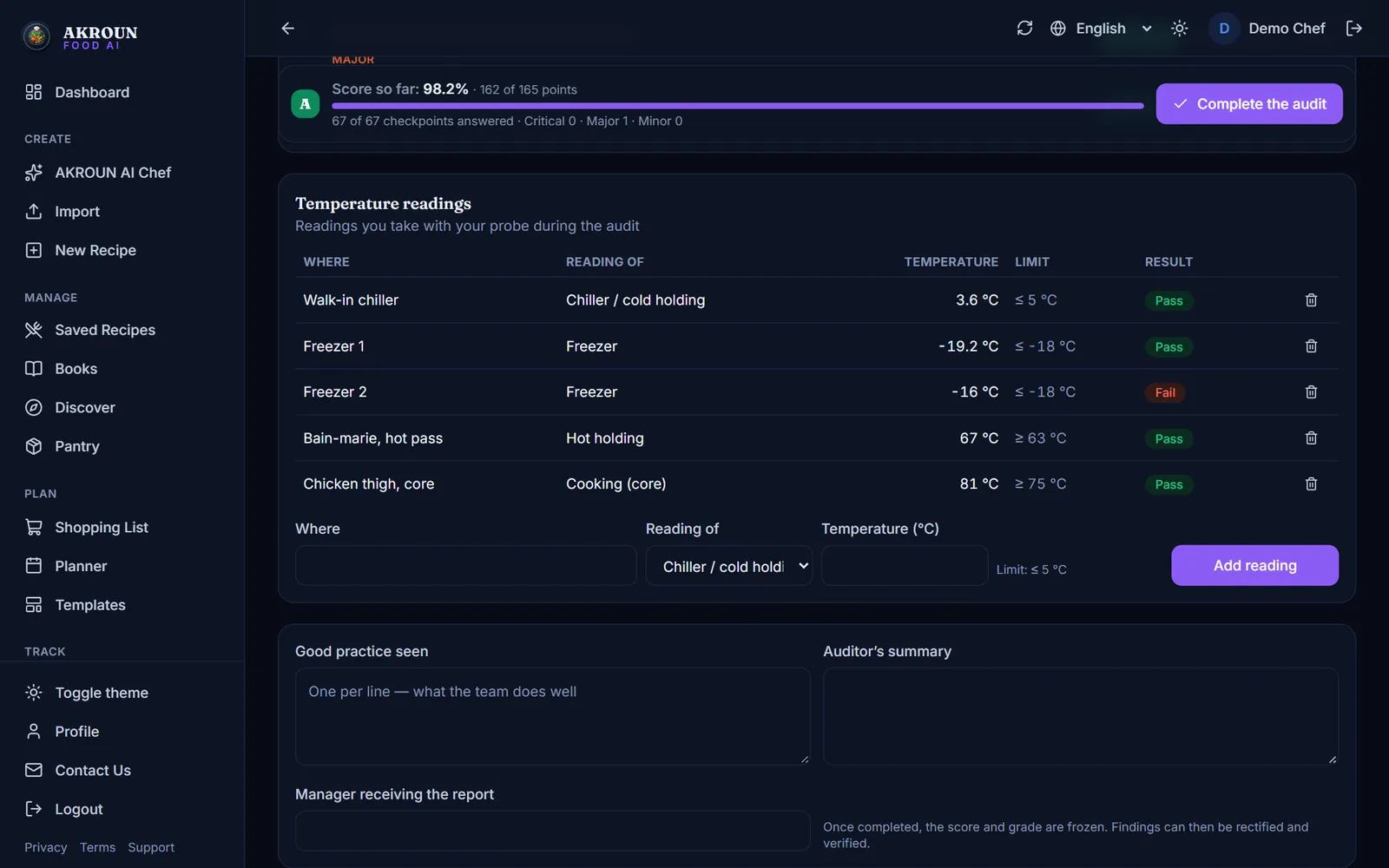
4. Complete the audit
Add the good practice you saw and a short summary, then press Complete the audit. Every critical checkpoint must be answered first. If a few other checkpoints are still open, you can choose Complete anyway and they are left out of the score.
Once completed, the score, the grade and the limits used are frozen — the grade of audit day never changes. Fix-by dates are set from that day: critical 3 days, major 7 days, minor 30 days.
5. Share the report
The report shows the grade, the score by area, every finding with its photo, the readings, the action plan, the full checklist and a sign-off block for the auditor, the person in charge and the manager. Press Print / save as PDF to print it or send it as a PDF.
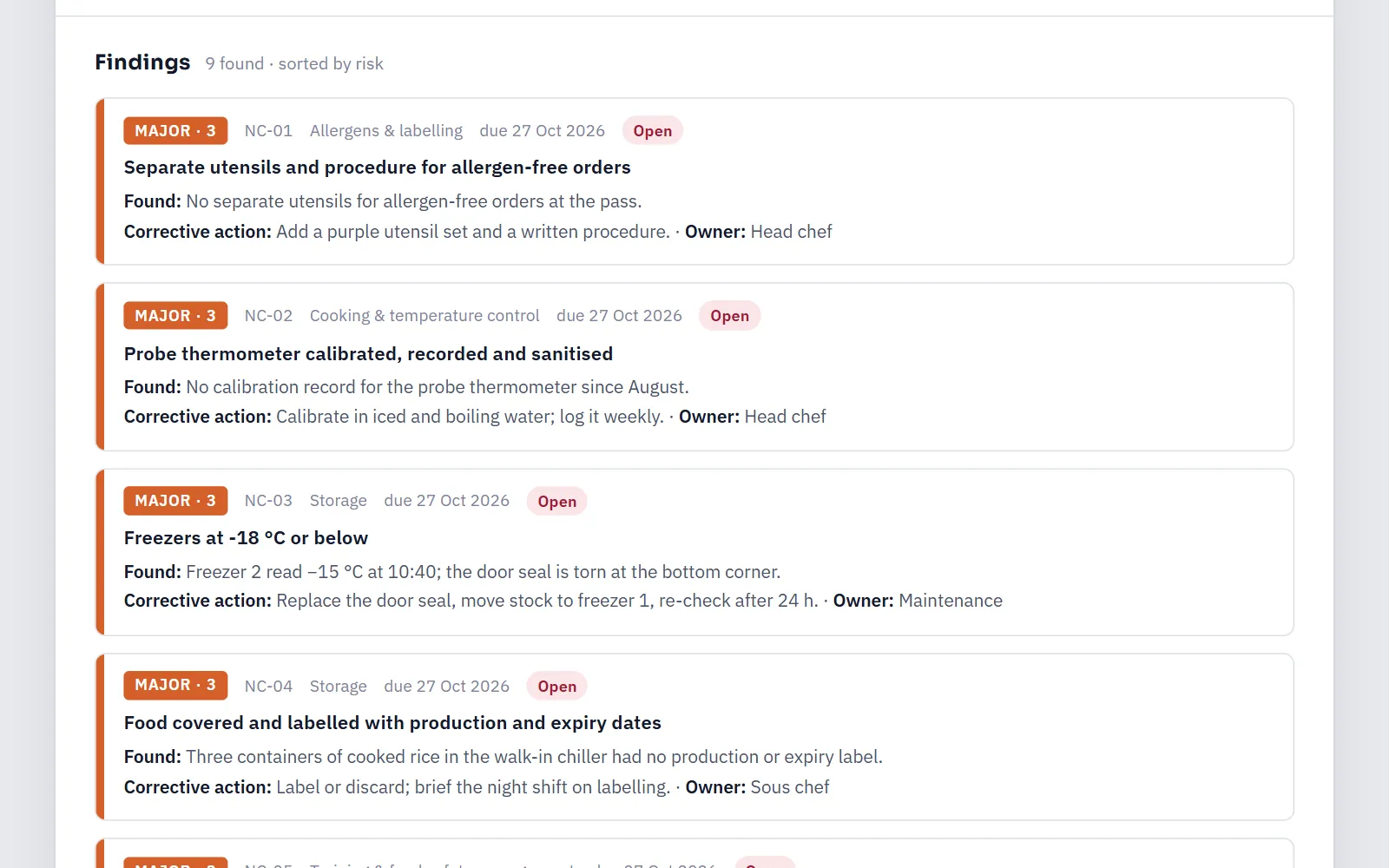
6. Close the corrective actions
Under Corrective actions, each finding moves from Open to Rectified to Verified. The person who fixed it presses Mark as rectified with a note or a photo of the fix; the auditor or manager checks it and presses Verify and close. If the fix did not hold, Reopen sends it back.
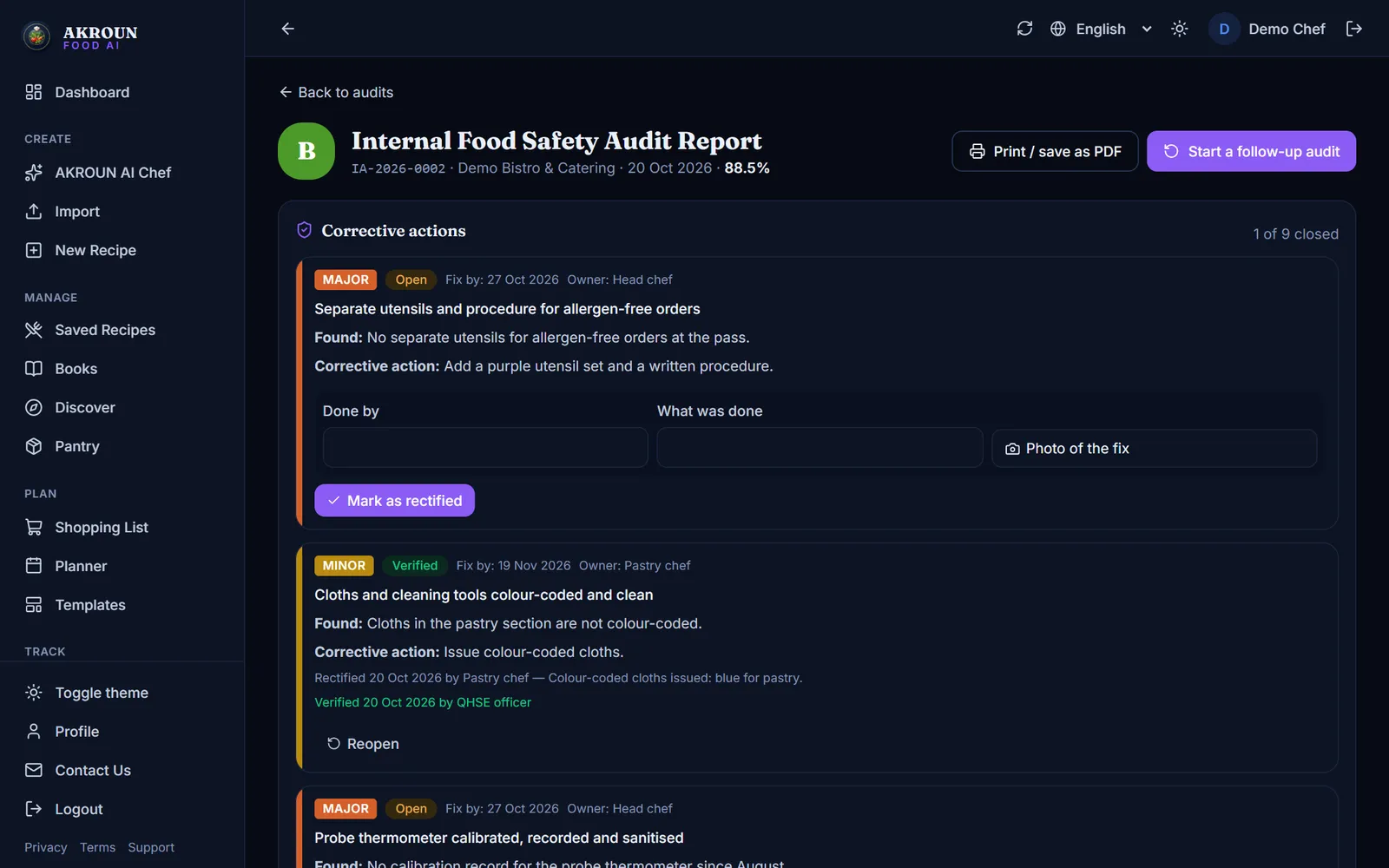
7. Run a follow-up audit
Press Start a follow-up audit. Everything that passed last time is already ticked, and every finding is checked again, so the follow-up takes minutes and gives you a fresh grade.
How the grade is worked out
| Checkpoint | Points |
|---|---|
| Critical — a direct risk to health | 5 |
| Major | 3 |
| Minor | 1 |
A compliant checkpoint earns its points, a non-compliant one earns 0, and N/A is left out. Score = points earned ÷ points available.
| Grade | Score |
|---|---|
| A+ Gold | 95% or more, with no critical and no major finding |
| A — Excellent | 90% or more |
| B — Very good | 80% or more |
| C — Acceptable | 70% or more |
| D — Poor | 60% or more |
| E — Very poor | below 60% |
Any critical finding caps the grade at C, whatever the score. You can change the cut-offs in Audit settings.
Tips from the pass
- Audit at least once a month, and at a different time of day each time — the late shift tells you more than the morning.
- Let a different person audit now and then. Fresh eyes find what the team no longer sees.
- Run one a week before an expected official inspection, and close the critical and major actions first.
- Use the photos: a picture of the fix is the fastest way to verify it.
This is an internal audit. It helps you prepare for an official inspection and does not replace one. Check your limits with your local food authority.

About the author
Ali Akroun, Executive Chef & Founder
Executive Chef and founder of AKROUN FOOD AI with 18+ years in professional kitchens, hospitality consulting and culinary training.
Read the founder story →Put this into practice in minutes
Recipes, costing, labels, inventory and nutrition — generated and organised for you in AKROUN FOOD AI.
Related articles

How to Make a Menu with Calories, Allergens and a QR Code
Turn your recipes into a printed menu with calories and allergens, a QR menu your guests open on their phone, and an allergen chart for your team — step by step.

Shelf-Life Labels Every Professional Kitchen Should Print
A prep label is the cheapest food-safety tool you own. Here is what belongs on it, how to set shelf life by storage type, and the mistakes inspectors notice first.

How to Give Your Kitchen Staff Their Own Accounts and Roles
Invite up to 6 staff, give each a role — manager, chef/cook or front of house — and see who logged what. Cooks never see prices. Step by step.