
How to Use the Menu Engineering Matrix: Stars, Plowhorses, Puzzles and Dogs
Find out which dishes make you money and which only keep the kitchen busy — from your real sales and food costs — and what to do with each one.

Some dishes fill the pass every night but barely make money. Others make a great margin but hardly anyone orders them. Menu engineering shows you which is which, so every change to the menu — a price, a portion, a place on the page — is a decision instead of a guess.
AKROUN FOOD AI does it with the numbers you already have: the dishes you sell, entered in Daily P&L, and the live food cost of each recipe from your inventory prices.
Menu engineering is part of the Chef Pro plan. You find it in the menu under Track → Menu Engineering.
The four boxes
| Box | What it means | What to do |
|---|---|---|
| Stars | Popular and profitable | Keep the recipe and portion as they are, give it the best spot on the menu, never discount it. |
| Plowhorses | Popular, low margin | Lower the food cost (portion, garnish, a cheaper ingredient) or raise the price a little; pair it with a high-margin side. |
| Puzzles | Profitable, rarely ordered | Help it sell: a better place on the menu, a photo or a better description, and ask staff to recommend it. |
| Dogs | Low sales, low margin | Rework it or take it off the menu — keep it only if it has a job, such as a kids or dietary option. |
Step by step
1. Enter your sales per dish
Menu engineering reads the dishes you sold, so it needs sales per dish, not just the day's total. Open Daily P&L, go to Enter a day and choose Detailed (per dish). Pick each dish, type the portions sold and the price, then press Save day. Copy previous day’s dishes saves time, and Import CSV brings in a sales file exported from any till.
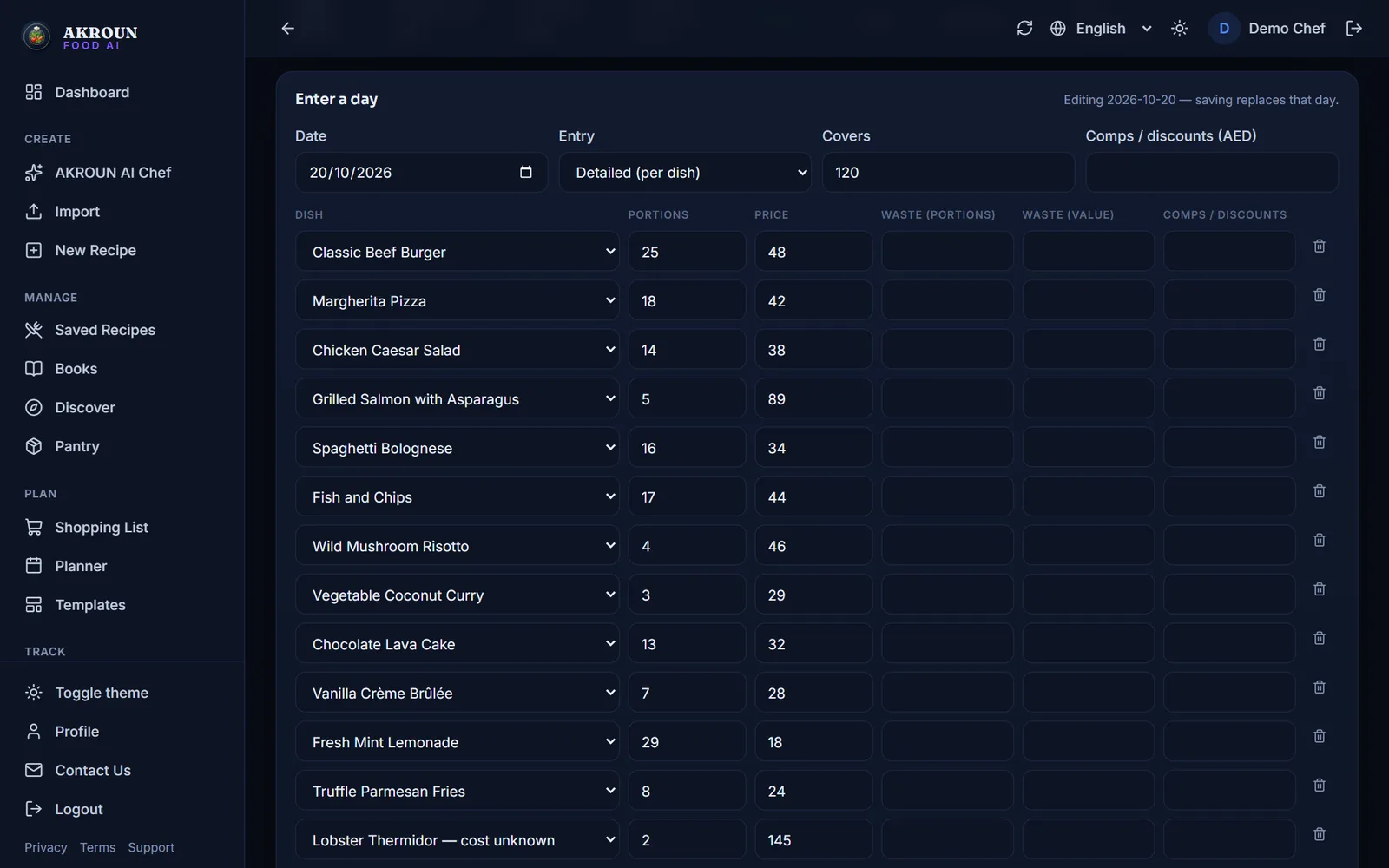
A day entered as a quick total has no dish breakdown, so it is not counted — the report tells you how many such days it skipped.
No sales entered yet? Open Menu Engineering and press Load the sample restaurant: a sample bistro with 13 dishes, their ingredient prices and 30 days of sales is added to your account so you can try everything first. It never changes your own items or days, and Remove sample data takes it all out again.
2. Make sure every dish has a food cost
The margin of a dish is its price minus its food cost, and the food cost comes from your Inventory prices and the recipe's ingredients. A dish with an ingredient that has no price yet is not guessed: it appears in a separate list, Not analysed — food cost unknown, with a link to add the missing prices.
3. Open Menu Engineering and choose what to compare
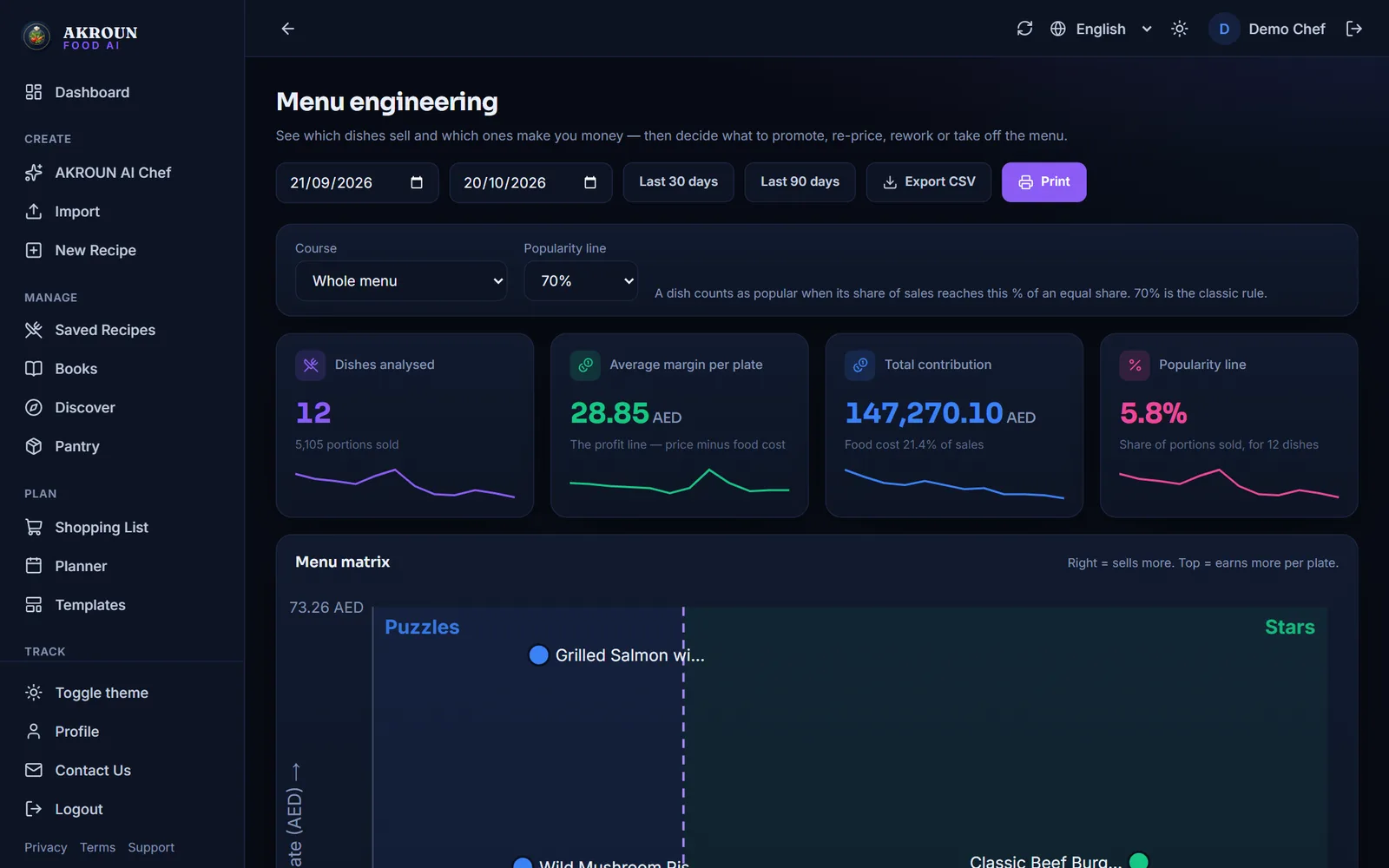
- Period: the last 30 or 90 days, or your own dates. A month or more gives steadier results than a single week.
- Course: compare one course at a time. A dessert should not compete with a main course.
- Popularity line: 70% is the classic rule (see below). You can move it to 60%, 80% or 100%.
4. Read the matrix
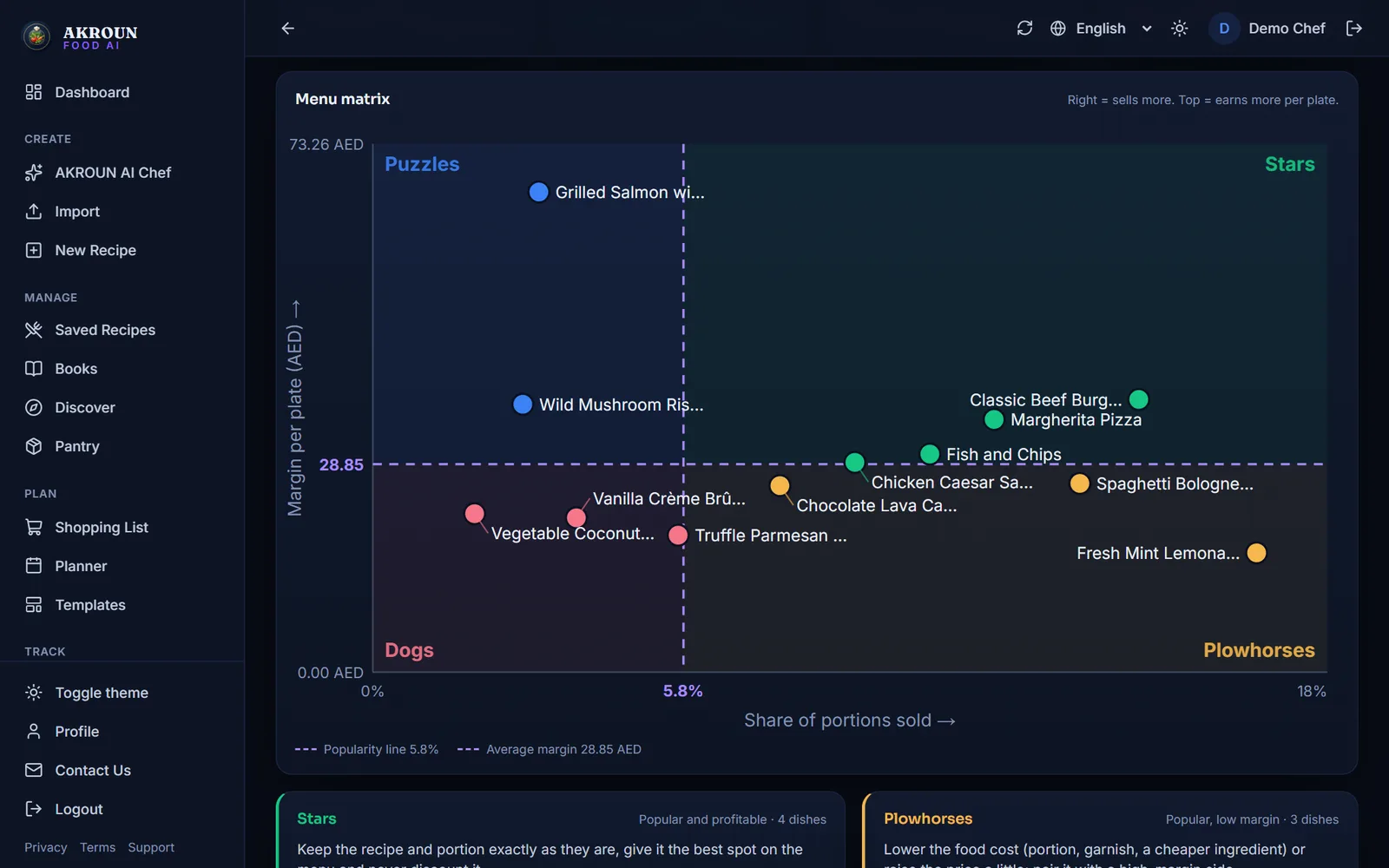
Every dot is a dish. Further right means it sells more; further up means it earns more per plate. The two dashed lines are the popularity line and the average margin, so the four corners are the four boxes. On a computer, hover over a dot to see its exact numbers; the table below lists them all.
5. Act on each box
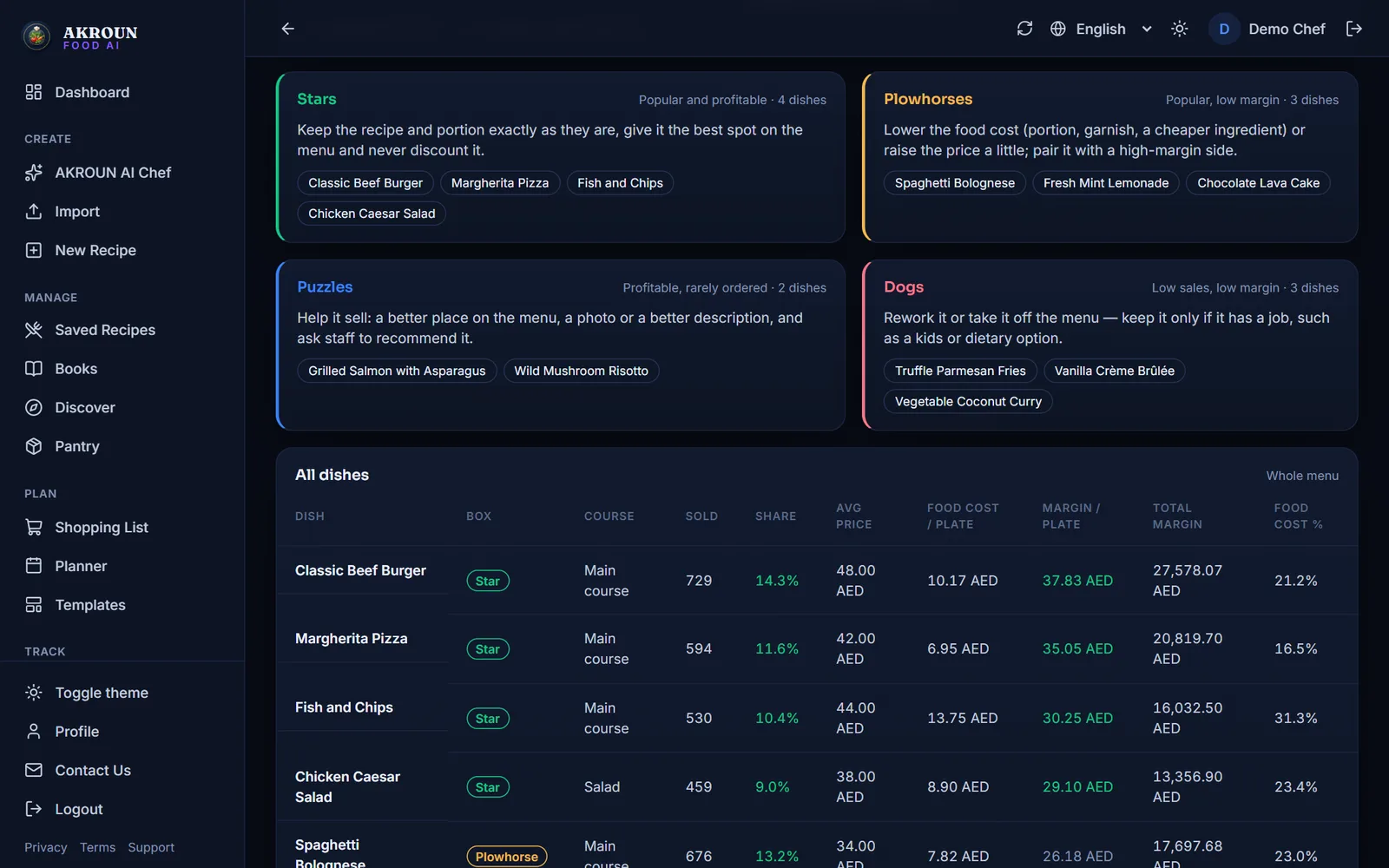
Under the chart, each box lists its dishes and the next step. Start with the Plowhorses: they already sell, so a small cut in food cost or a small price rise adds up quickly.
6. Check the numbers, print or export
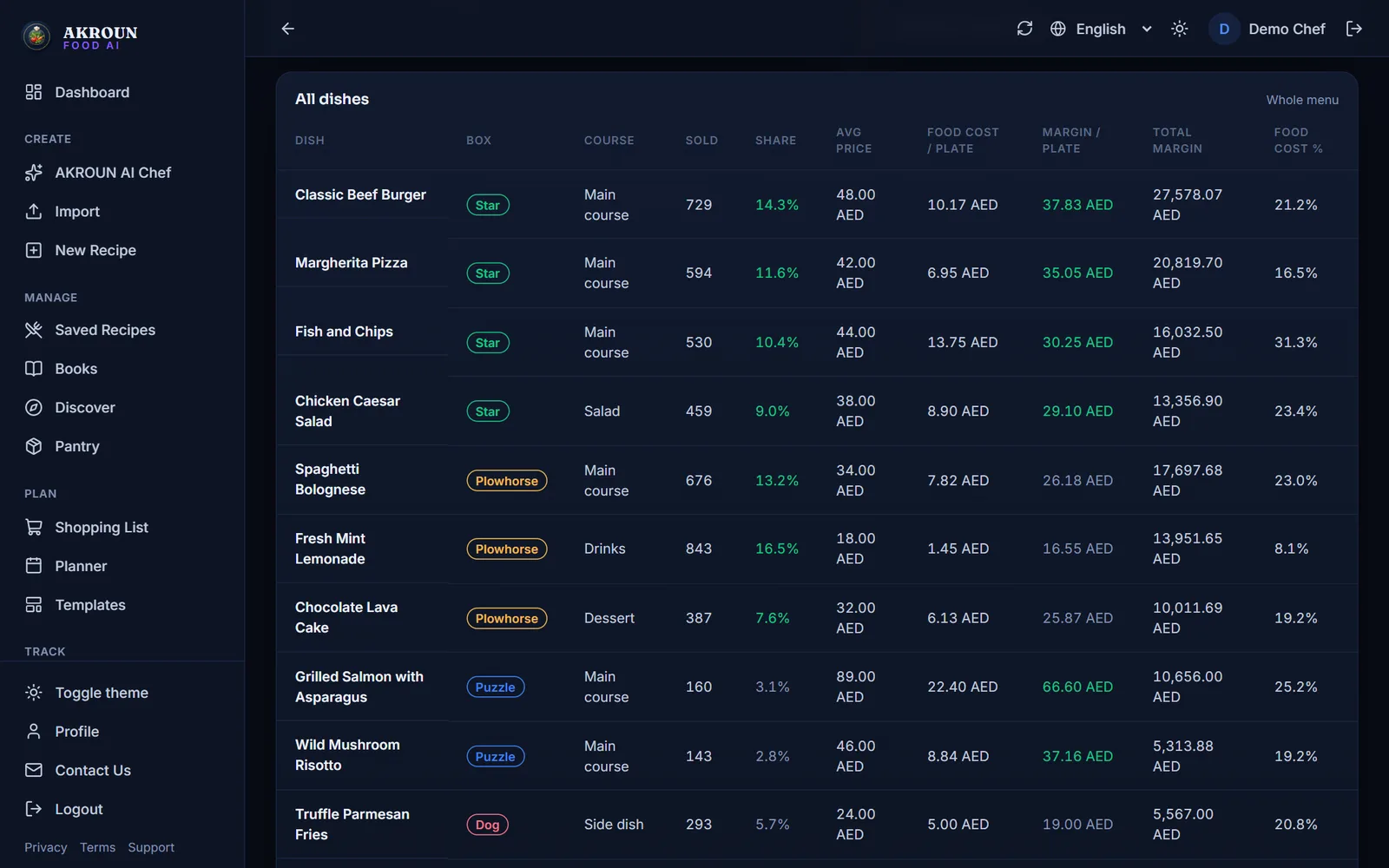
The table shows every number behind the chart. Press Print for the menu meeting, or Export CSV to work on it in a spreadsheet.
How the two lines are calculated
The method is the classic one from Kasavana and Smith:
- Popularity line = an equal share × 70%. With 4 dishes an equal share is 25%, so the line is 17.5%. A dish at or above it is popular.
- Average margin = all margin earned ÷ all portions sold — an average weighted by sales, not a simple average of the dishes.
A worked example with four dishes:
| Dish | Sold | Price | Food cost | Margin / plate | Share | Box |
|---|---|---|---|---|---|---|
| A | 100 | 20.00 | 6.00 | 14.00 | 47.6% | Star |
| B | 80 | 12.00 | 6.00 | 6.00 | 38.1% | Plowhorse |
| C | 20 | 30.00 | 9.00 | 21.00 | 9.5% | Puzzle |
| D | 10 | 10.00 | 6.00 | 4.00 | 4.8% | Dog |
210 portions earned 2,340 in margin, so the average margin is 11.14 per plate. A and B are above the 17.5% line, so they are popular; A and C are above 11.14, so they are profitable. That gives A = Star, B = Plowhorse, C = Puzzle, D = Dog.
Tips from the kitchen
- Run it once a month, and again two to four weeks after you change the menu, so the new numbers have time to settle.
- Do not remove a Dog without asking why it is there: a children's dish or a vegan option can earn its place.
- Waste is not part of the margin here — you will find it in Daily P&L, where it belongs.
- To check one dish's numbers by hand, try the free food cost calculator.
Free chef tools mentioned here

About the author
Ali Akroun, Executive Chef & Founder
Executive Chef and founder of AKROUN FOOD AI with 18+ years in professional kitchens, hospitality consulting and culinary training.
Read the founder story →Put this into practice in minutes
Recipes, costing, labels, inventory and nutrition — generated and organised for you in AKROUN FOOD AI.
Related articles

How to Give Your Kitchen Staff Their Own Accounts and Roles
Invite up to 6 staff, give each a role — manager, chef/cook or front of house — and see who logged what. Cooks never see prices. Step by step.

How to Track Food Waste in Your Kitchen and What It Costs
Log what is thrown away and why in a few seconds, see what it costs by day, by reason and by item, and track buffet leftovers — step by step.

How to Scan Supplier Invoices and Update Your Food Costs Automatically
Photograph, upload or import a supplier invoice. You check every line, then prices, received stock and recipe costs update in one click — and one click undoes it.